Top Cloud Storage Providers Compared: Features, Pricing, and Security
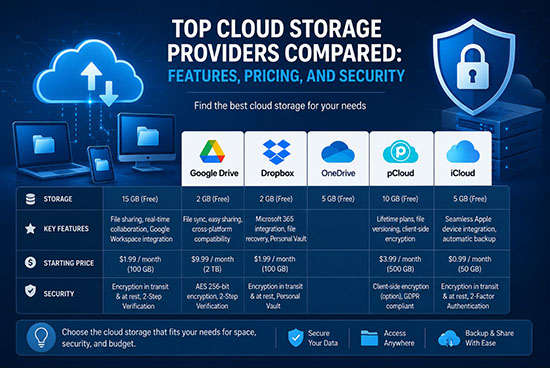
Cloud storage has become an essential part of modern digital life. Individuals use it to back up photos, documents, and personal files, while businesses rely on cloud platforms to collaborate, protect data, and support remote work. However, choosing the right provider can be challenging because services differ significantly in storage capacity, pricing, security, collaboration tools, and performance.
This comparison examines some of the leading cloud storage providers and explains what makes each service suitable for different users.
Google Drive: Best for Collaboration
Google Drive is one of the most widely used cloud storage platforms, particularly among users already familiar with Google Workspace. It provides seamless integration with Google Docs, Sheets, Slides, Gmail, and other Google services.
The free plan includes 15 GB of storage shared across Google Drive, Gmail, and Google Photos. Paid Google One plans provide additional capacity and are available at different storage levels. Businesses can also use Google Workspace plans with enhanced collaboration and administration features.
Security is another major advantage. Google provides encryption for data in transit and at rest, account security controls, two-factor authentication, and suspicious-activity monitoring. For organizations that prioritize real-time collaboration, Google Drive is difficult to overlook.
Microsoft OneDrive: Best for Microsoft Users
Microsoft OneDrive is particularly attractive to people and organizations that use Windows and Microsoft 365. It integrates directly with Windows File Explorer and works closely with Word, Excel, PowerPoint, Outlook, and Teams.
OneDrive makes file synchronization simple across computers and mobile devices. Users can also share files through links and control permissions when collaborating with others.
Security features include encryption, personal vault functionality, identity protection, file recovery, and administrative controls for business customers. Microsoft 365 subscriptions can also bundle OneDrive storage with productivity applications, potentially making the overall package more valuable than purchasing storage separately.
For households, students, and businesses already invested in Microsoft’s ecosystem, OneDrive offers excellent convenience.
Dropbox: Best for File Synchronization
Dropbox helped popularize cloud-based file synchronization and remains a strong option for users who want a straightforward way to access files across multiple devices.
Its interface is relatively simple, and synchronization is one of its strongest features. Dropbox also provides file sharing, version history, collaboration tools, and integrations with numerous third-party applications.
Business customers receive additional administrative and security capabilities, including access controls and monitoring features. Dropbox has also expanded beyond basic storage into document workflows and productivity services.
The main consideration is pricing. Users should compare available storage and features carefully against competitors because other providers may offer more storage or bundled applications for similar subscription costs.
Apple iCloud: Best for Apple Ecosystems
Apple iCloud is the natural choice for many iPhone, iPad, and Mac users. It automatically synchronizes important information such as photos, documents, contacts, notes, and device backups across Apple devices.
Its biggest advantage is integration. Users do not need to manage complicated synchronization software because iCloud operates closely with Apple’s operating systems and applications.
Apple provides multiple storage tiers, including a small free allowance and larger paid plans. Security is also a major focus, with encryption and additional privacy technologies available depending on the service and account configuration.
For someone who primarily uses Apple hardware, iCloud can be more convenient than a platform offering more advanced standalone storage features.
Amazon Drive Alternatives and Cloud Services
Amazon has a substantial presence in cloud computing through Amazon Web Services, although consumer cloud storage needs are better evaluated through currently available Amazon consumer and business offerings rather than assuming that AWS is equivalent to a personal cloud drive.
AWS services such as Amazon S3 are designed primarily for developers, businesses, applications, backups, and large-scale data storage. Pricing is generally usage-based, meaning customers pay according to storage, requests, data transfer, and other factors.
This model can be highly flexible but is more complicated than consumer storage subscriptions. Organizations with technical teams may benefit from the scalability and customization available through AWS.
Proton Drive: Best for Privacy
Proton Drive is designed with privacy as a central principle. It appeals to users who want stronger control over sensitive personal files and prefer privacy-focused online services.
End-to-end encryption is a key feature, meaning files are designed to remain protected from unauthorized access while being stored and transferred. Proton’s broader ecosystem also includes privacy-focused email, VPN, and other services.
Although Proton Drive may not provide the same productivity ecosystem as Google or Microsoft, its privacy orientation makes it worth considering for users who value confidentiality over extensive office-suite integration.
Security: What Should You Look For?
Security should be one of the most important factors when selecting cloud storage. A provider should offer encryption, strong authentication, reliable account recovery, and tools for controlling file access.
Two-factor authentication is particularly important because passwords alone can be compromised. Users should also examine whether the provider offers end-to-end encryption, version history, ransomware protection, file recovery, and suspicious-login notifications.
Businesses should go further by evaluating compliance certifications, administrative controls, audit logs, data residency options, and centralized identity management.
Pricing: Look Beyond the Monthly Fee
The cheapest cloud storage plan is not necessarily the best value. Consider how much storage you receive, whether the plan includes productivity applications, how many users can share it, and whether advanced security features are included.
A bundled subscription can sometimes provide substantially greater value than a storage-only plan. For example, a Microsoft 365 or Google Workspace subscription may combine storage with productivity applications and collaboration features.
Businesses should also consider long-term costs, including data transfer, additional users, backup requirements, and potential migration expenses.
Which Cloud Storage Provider Should You Choose?
There is no universal winner. Google Drive is excellent for collaboration and Google Workspace integration. OneDrive is particularly strong for Microsoft users. Dropbox remains a dependable choice for synchronization and file sharing. iCloud is highly convenient for Apple users, while Proton Drive stands out for privacy-conscious customers. AWS is better suited to technical and enterprise workloads requiring scalability and customization.
Ultimately, the best provider depends on your priorities. Compare storage capacity, total cost, synchronization performance, collaboration features, security controls, privacy policies, and ecosystem compatibility before making a decision.
Cloud storage is more than an online folder. The right platform can improve productivity, protect valuable information, simplify collaboration, and provide reliable access to files from almost anywhere. By evaluating features, pricing, and security together, users can choose a cloud storage solution that provides strong long-term value without compromising convenience or data protection.